
The New King Guide Online
Every effort has been made to make the King Guide the most complete and easy to use IV drug compatibility reference available.
Everything in 3 Easy Steps
Step 1: Add a Drug
Type the first few letters of a drug and immediatly see everything there is to know about that drug
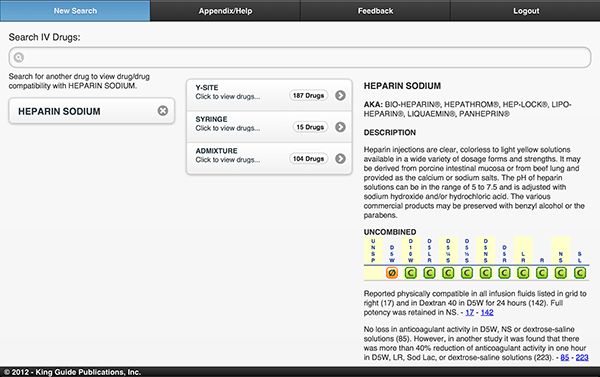
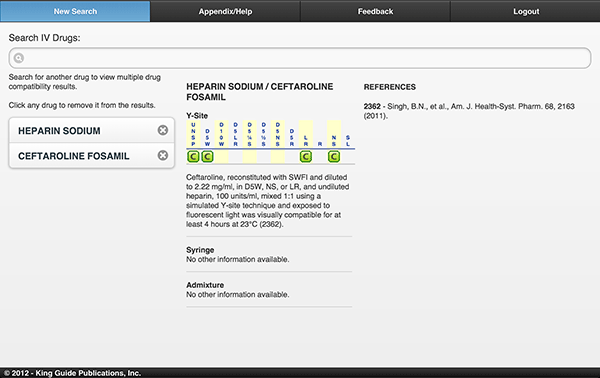
Step 2: Add A 2nd Drug
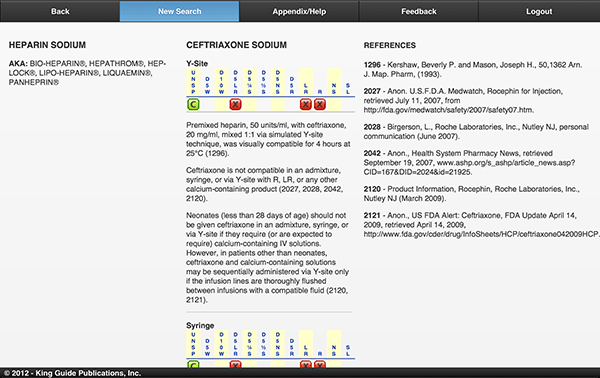
Add a 2nd drug, by typing the first few letters, and see complete compatibility and stability results without leaving the screen.
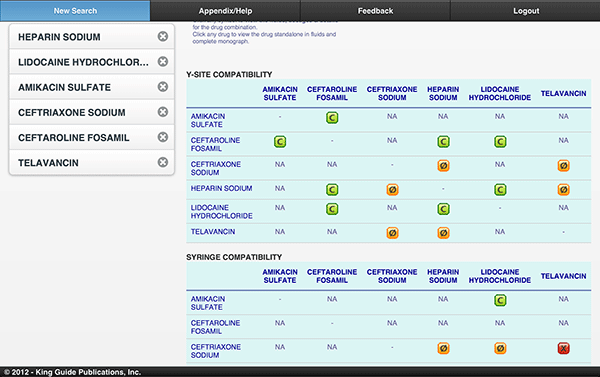
Step 3: View Compatibility for Multiple Drugs
Add up to 10 drugs and watch the compatibility results table grow without leaving the screen.
Or Step 2: View as List
Click one of the method of mixing buttons in the middle column 'Y-Site', 'Syringe', or 'Admixture'.
Easily see every drug combined with the first drug.
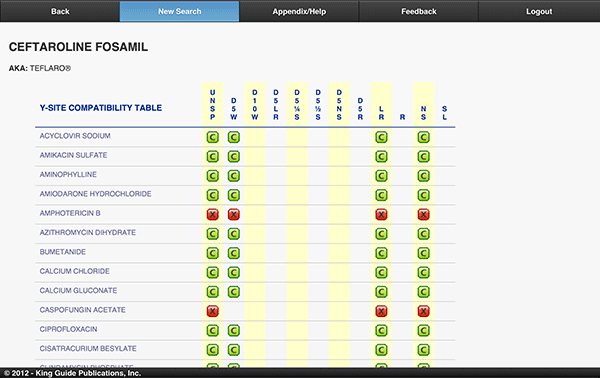
Step 3: Click any Drug in the List
Immediately see the complete drug/drug monograph.
Any Computer or Device, Peer Reviewed, Always Up-To-Date
Desktop, Tablet, or Phone, the New King Guide provides complete, peer reviewed monographs that are always up-to-date via quarterly updates.
Order Now